
Bulk Image Downloader vs Fatkun — Workflow Comparison
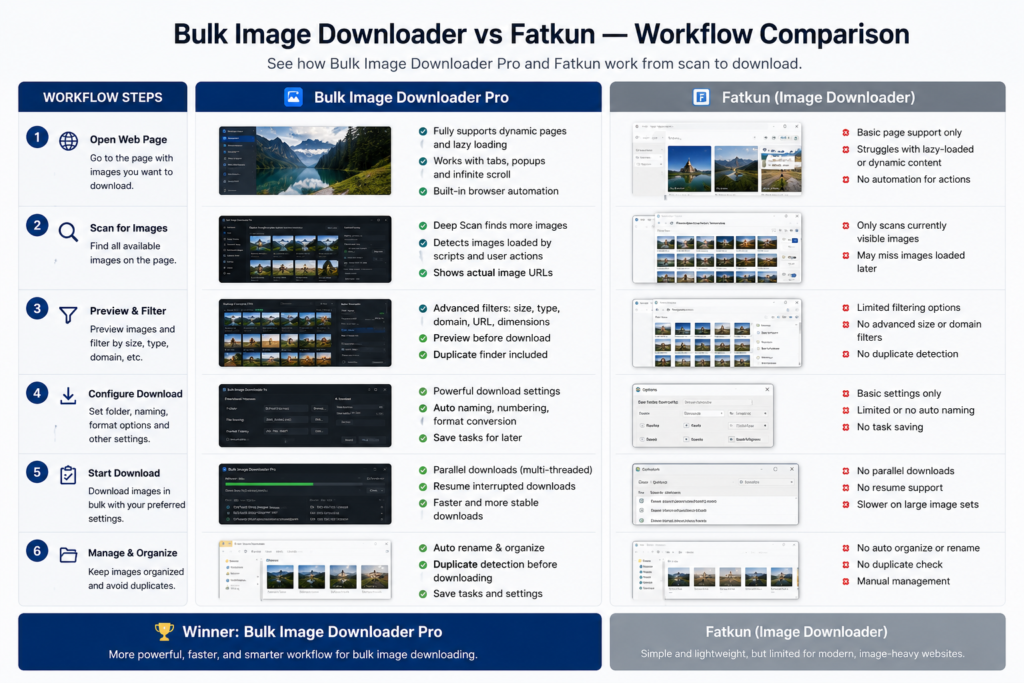
Fatkun is a well-known batch image downloader for people who want to grab images from web pages quickly. It is especially associated with current-tab and multi-tab workflows, visual selection, filtering, and saving batches without much setup.
Bulk Image Downloader Pro is built around a different idea: not just grabbing a page, but turning image collection into a repeatable task workflow. The best choice depends on whether your job is a quick grab or a structured process you expect to repeat.
Where Fatkun is a good fit
Fatkun makes sense when you have one or more open tabs and want to collect images quickly from what is already in front of you. Public feature descriptions highlight batch downloading, image preview/selection, filtering by size or URL, support for common formats, multi-tab downloading, and folder or ZIP-style output depending on setup.
That is useful for fast ecommerce checks, product browsing, inspiration gathering, or simple one-time page captures where the main goal is speed.
Where Bulk Image Downloader Pro is different
Bulk Image Downloader Pro puts more structure around the job. In the side panel, you can scan the current page, run Deep Scan for lazy-loaded images, use Area Scan for part of a page, or scrape a list of page URLs. The result list can be filtered, deduplicated, exported, saved as a session, or sent into an options-page download task.
The options page then handles the output workflow: folders, ZIP output, filename construction, custom filename files, Download IF URL rules, parallel or queued execution, resize, convert, EXIF stripping, watermarking, URL checks, duplicate review, and CSV task import/export.
Choose by workflow, not by brand name
- Use Fatkun when you want a fast page or multi-tab grabber and do not need a saved task pipeline.
- Use Bulk Image Downloader Pro when you need to scrape a URL list, repeat a job, name files predictably, process images during download, or keep a task configuration for later.
- Use either responsibly because downloaded images may be protected by copyright, licensing, platform terms, or client restrictions.
Output control is the main difference
Fast grabbers are great until the output needs to follow a rule. If you need every file named by product, class, property, campaign, or sequence, the filename constructor and custom filename upload in Bulk Image Downloader Pro become important. If you need to skip URLs that do not match a pattern, Download IF rules help before the files hit disk.
For teams, the repeatability matters even more. A saved task or CSV export can preserve folder rules, naming rules, file filters, and processing choices so another batch follows the same structure.
A fair conclusion
Fatkun is a strong option for quick page and multi-tab collection. Bulk Image Downloader Pro is a better fit when the job needs structure: URL lists, task management, careful naming, processing, duplicate review, and repeatable output.
If you only need today’s images from open tabs, choose the simpler path. If the same image workflow will come back tomorrow, build it as a task.
Continue reading: Bulk Image Downloader vs Download All Images.
Get Bulk Image Downloader Pro on the Chrome Web Store, watch the tutorial video, or visit our YouTube channel for more image download workflows.