
Bulk Image Downloader vs Image Downloader — Honest Comparison
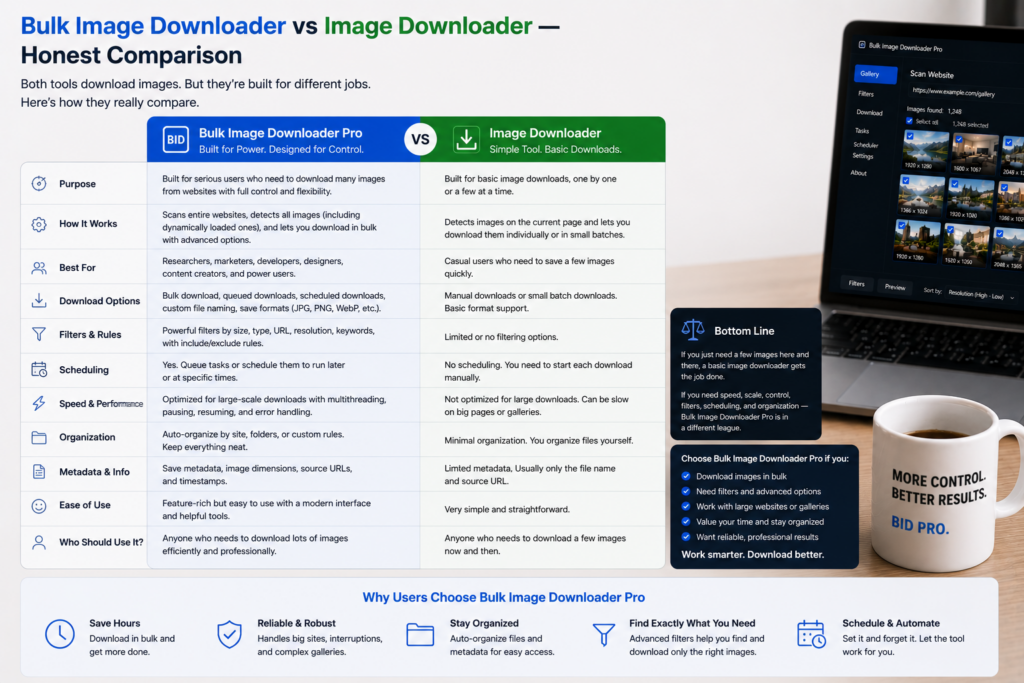
Searching Bulk Image Downloader vs Image Downloader usually means you want a quick page grabber or a workflow that survives bigger jobs. The generic Image Downloader category (simple extensions that list images on the current tab) is excellent for small, one-off picks. Bulk Image Downloader Pro targets repeat bulk work: URL lists, scrolling pages, saved tasks, and on-download processing.
This is a fair comparison. Both approaches keep processing in your browser. Neither is universally better; they answer different questions.
What generic Image Downloader extensions do well
Classic Image Downloader-style tools are intentionally minimal:
- open the extension on one page
- see images already in the DOM
- filter by URL text or dimensions
- download the checked thumbnails
For a handful of visible files on a single page, that is often enough. Reaching for a heavier workflow would be overkill.
Where page-level grabbers run out of road
- Lazy loading and infinite scroll hide images until you scroll; a static snapshot misses many URLs
- Multi-page sources require repeating the same steps on every tab
- Post-download chores (rename, resize, convert, dedupe) stay manual
- Repeatable jobs are not saved as structured tasks you can export and restore
What Bulk Image Downloader Pro adds
- Side-panel scraping with Scan, Deep Scan, and Area Scan for lazy-loaded content
- URL-list workflows on the options page for many pages or direct image links
- Download If URL rules (contains, not-contains, regex with AND/OR logic)
- Saved tasks, draft save, and CSV export/import for repeatable jobs
- On-download processing: resize, convert (JPEG/WebP/PNG), optional EXIF strip, PNG watermark (Licensed PRO controls)
- Perceptual duplicate finder, 404 checker, and redirect checker for cleanup
- Filename Constructor, auto folders, and optional ZIP packaging
Side-panel Saved Rules store custom selectors for sites you revisit. Scraper sessions can be compared when you need to see what changed between runs.
Side-by-side snapshot
| Capability | Generic Image Downloader | Bulk Image Downloader Pro |
|---|---|---|
| Visible images on one page | Yes | Yes |
| Deep / lazy-load capture | Limited | Deep Scan |
| Bulk URL lists | No | Yes |
| Saved tasks + CSV backup | No | Yes |
| Rename / resize / convert on download | No | Yes (PRO processing) |
| Visual duplicate detection | No | Yes |
| Link validation (404 / redirects) | No | Yes |
Which one to pick
Choose a generic Image Downloader when the job is small, single-page, and one-time.
Choose Bulk Image Downloader Pro when you repeat the workflow, pull from long URL lists, need images that load on scroll, or care about naming, folders, deduplication, and on-download processing.
Many people keep a simple grabber for quick saves and use a workflow tool when the batch grows.
Install Bulk Image Downloader Pro when your jobs outgrow one tab at a time.
Continue reading: Fatkun Alternative.
Get Bulk Image Downloader Pro on the Chrome Web Store, watch the tutorial video, or visit our YouTube channel for more comparison guides.