
Deep Scan Lazy Loaded Images — Bulk Image Downloader Pro
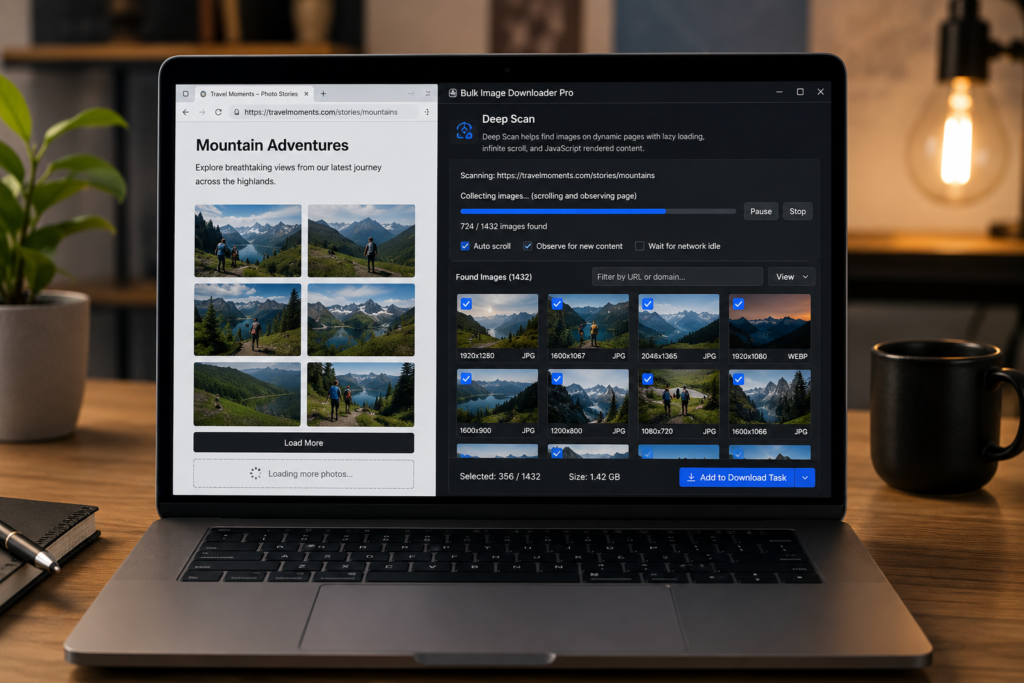
If a normal scan misses half the gallery, the page may not have loaded those image URLs yet. Many modern sites wait until you scroll, open a tab, trigger a script, or reach the bottom of a feed before loading more media. That is when it makes sense to deep scan lazy loaded images.
Deep Scan in Bulk Image Downloader Pro is a side-panel scan mode for dynamic pages. It is designed for lazy-loaded images, AJAX galleries, infinite feeds, and pages where a quick scan only sees the first visible set.
Why a normal scan can miss images
A basic page scan can only collect what the browser can currently see or access in the page context. If the real image URL has not loaded yet, the scan may find placeholders, thumbnail shells, or nothing useful.
Lazy loading improves website speed, but it also means an image downloader has to give the page time to reveal more content.
What Deep Scan does differently
Deep Scan works more like a patient manual pass. It gives dynamic content time to appear, scrolls or observes the page as new content loads, and keeps collecting image candidates as they become available.
It is useful for pages that use JavaScript rendering, infinite scroll, late-loading product grids, photo feeds, or galleries that update after the first page load.
When to use Deep Scan
Use Scan Current Page first when the page is simple. Switch to Deep Scan when the page keeps loading images after interaction or scrolling. It is especially useful for ecommerce grids, editorial galleries, travel pages, image feeds, and pages where the visible images do not match the full set you expected.
For very busy pages, pair Deep Scan with preview filters afterward so you do not download icons, ads, or repeated layout assets.
What Deep Scan cannot fix
Deep Scan is not a bypass tool. It cannot access images behind logins you have not completed, private content you cannot view, blocked media, expired URLs, DRM-like protections, or files the browser never receives.
If Chrome or the site blocks extension access, permission notices may appear. Fix the access issue first, then scan again.
A practical Deep Scan workflow
- Open the page and scroll or interact enough to reveal the section you care about.
- Run Scan Current Page as a quick first pass.
- Use Deep Scan if expected images are missing.
- Let the scan run long enough for lazy content to appear.
- Preview and filter the results by size, format, domain, or selection.
- Send only the useful images to a download task.
For broader dynamic-page guidance, read extract images from complex webpages. For infinite feeds, see extract images from infinite scroll.