
Download Food Blog Images in Bulk — Bulk Image Downloader Pro
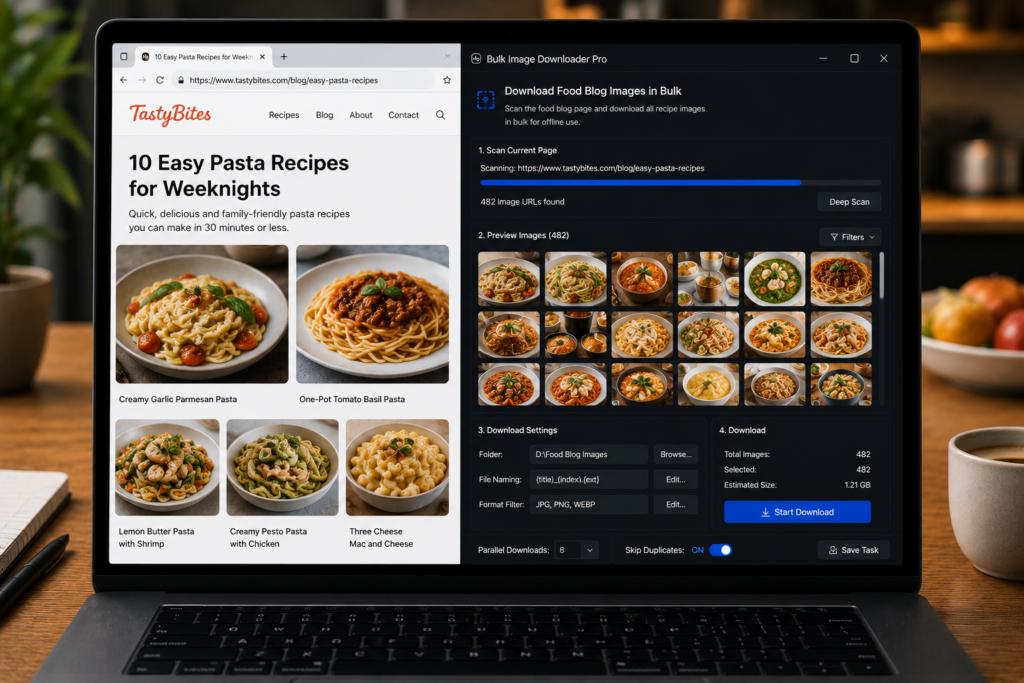
Food creators, recipe publishers, and content teams often need to collect images in batches: their own recipe photos for a media kit, old blog images before a redesign, licensed reference images, or internal inspiration sets for styling and plating.
Bulk Image Downloader Pro helps with the collection workflow when you have the right to download and use the images. It scans browser-accessible pages, filters out page clutter, removes repeats, and sends the cleaned image set into an organized download task.
Start with the right kind of source
Use this workflow for your own food blog, client-approved recipe pages, licensed content, or reference material you are allowed to save. Do not treat a downloader as permission to reuse another creator’s food photography. Rights and attribution still matter.
For one recipe page, open the side panel and run Deep Scan. Recipe pages often lazy-load step photos, process shots, and final dish images as you scroll. For a larger archive, collect the post URLs and use Bulk URL Scraping with a delay between pages.
Separate the food photos from the page noise
Food blogs can be visually busy. A scan may find recipe-card icons, author avatars, Pinterest buttons, ad images, affiliate banners, logos, and social graphics. Use filters before downloading:
- Minimum dimensions to remove tiny interface assets.
- File type filters for the formats you want to keep.
- Aspect ratio filters when you need vertical pins, square thumbnails, or wide hero images.
- Source domain filters when useful photos come from the site’s own media host.
Show thumbnails during review. Food imagery is visual by nature, and a thumbnail pass makes it much easier to remove banners, badges, and unrelated graphics.
Remove duplicate recipe images
The same finished dish photo may appear as a hero image, recipe-card image, social preview, and in-page image. Exact URL deduplication in the side panel catches repeated URLs before the task is created. If the same image appears under different URLs or sizes, the Perceptual Duplicate Finder on the options page can help flag visual repeats for review.
For your own archive, keeping the best version matters. Use duplicate review to keep the largest or most useful copy instead of downloading every repeated instance.
Organize by recipe, theme, or project
On the options page, choose folder names that match how you will use the files later. A food blogger might organize by recipe title, category, campaign, season, or project. The filename constructor can add custom text, sequence numbers, timestamps, URL fragments, or website names so the files stay readable after download.
If you need consistent output for a media kit or web migration, resize or convert supported images during download. EXIF stripping can remove camera metadata through re-encoding when you do not need that data in the exported set.
Keep reference libraries separate from publishable assets
Reference images are helpful for styling direction, but they are not automatically publishable. Keep inspiration folders separate from photos you own or license. That habit prevents accidental misuse later when a content calendar gets busy.
Used carefully, Bulk Image Downloader Pro reduces the tedious part: collecting, filtering, deduping, and filing the image set so your creative or publishing work starts from an organized folder.
Continue reading: archive website images before a redesign.
Get Bulk Image Downloader Pro on the Chrome Web Store, watch the tutorial video, or visit our YouTube channel for more image download workflows.