
Bulk Image Downloader vs Scraper Extensions — Bulk Image Downloader Pro
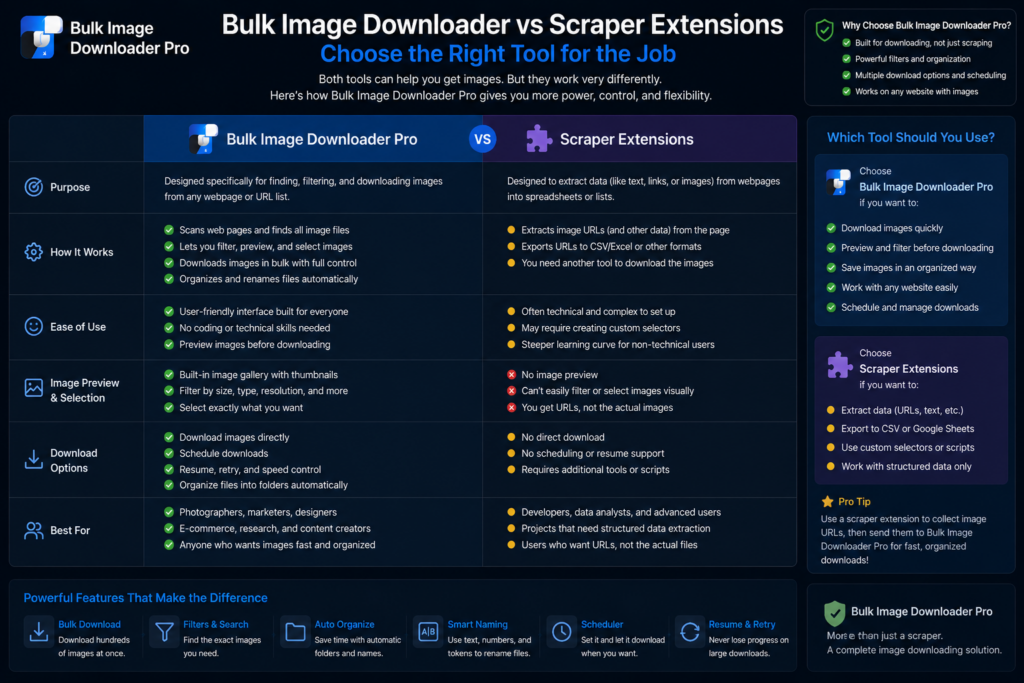
Most image scraper extensions follow the same pattern: open a page, list visible images, filter lightly, save or ZIP. That works for a single gallery. Bulk image downloader vs scraper extensions becomes relevant when images hide behind scroll, catalogs span dozens of pages, or output needs consistent naming every week.
Bulk Image Downloader Pro is a workflow tool, not a one-click grabber. For a fast save from one visible page, simpler extensions like Imageye or Download All Images are often faster. This comparison is fair on both sides.
What typical scraper extensions do well
Common strengths across the category (Image Downloader, Imageye, Download All Images, ImageAssistant, and similar):
- thumbnail grid with quick size or URL filters
- bulk select and download from the active tab
- one-click ZIP on some tools
- basic WebP-to-JPG/PNG conversion on a few
Simplicity is a real advantage for ad hoc saves. The shared ceiling is scope: one page at a time, mostly what already rendered, with little structure for repeat jobs.
Where one-click scrapers run out of road
- infinite scroll and AJAX galleries need manual scrolling first
- paginated catalogs mean open page, save, click next, repeat
- multi-URL jobs lack saved task lists and CSV backup
- cleanup (rename, resize, visual dedupe) stays manual after download
What this extension adds
- Deep Scan for lazy-loaded images; Area Scan for a page region; Continuous Scanning for live-updating pages
- pagination with auto-detect or manual page ranges (max 100 pages)
- Bulk URL scrape across pasted page URLs (up to 500 per run)
- Stack Mode, Saved Rules, and exportable scraper sessions
- Download If URL rules, filename constructor, auto folders, per-task ZIP
- perceptual duplicate finder plus 404 and redirect checkers
- on-download resize or convert, EXIF strip, PNG watermark (PRO; resize and convert are mutually exclusive per task)
Comparison table
| Capability | Typical scraper extensions | Bulk Image Downloader Pro |
|---|---|---|
| Single visible page grab | Yes | Yes |
| Lazy-load / live page capture | Limited | Deep Scan + Continuous Scanning |
| Paginated catalog crawl | Manual | Pagination + URL lists |
| Saved rules / sessions / tasks | Rare | Yes |
| Visual dedupe + link checkers | No | Yes |
| On-download processing | Rare | Yes (PRO) |
Choose honestly
One visible page, done once: a lightweight scraper extension is often the right call.
Recurring multi-page jobs with filters, naming, dedupe, and local processing: this workflow tool earns its complexity.
Privacy is part of the comparison too. Processing runs client-side in Web Workers; tasks live in chrome.storage.local. Weigh capability and data handling together.
Install Bulk Image Downloader Pro when the job is a process you expect to run again, not a one-off grab.
Continue reading: Image Downloader Extension Permissions.
Get Bulk Image Downloader Pro on the Chrome Web Store, watch the tutorial video, or visit our YouTube channel for more scraper comparisons.