
Image Downloader vs gallery-dl — Bulk Image Downloader Pro
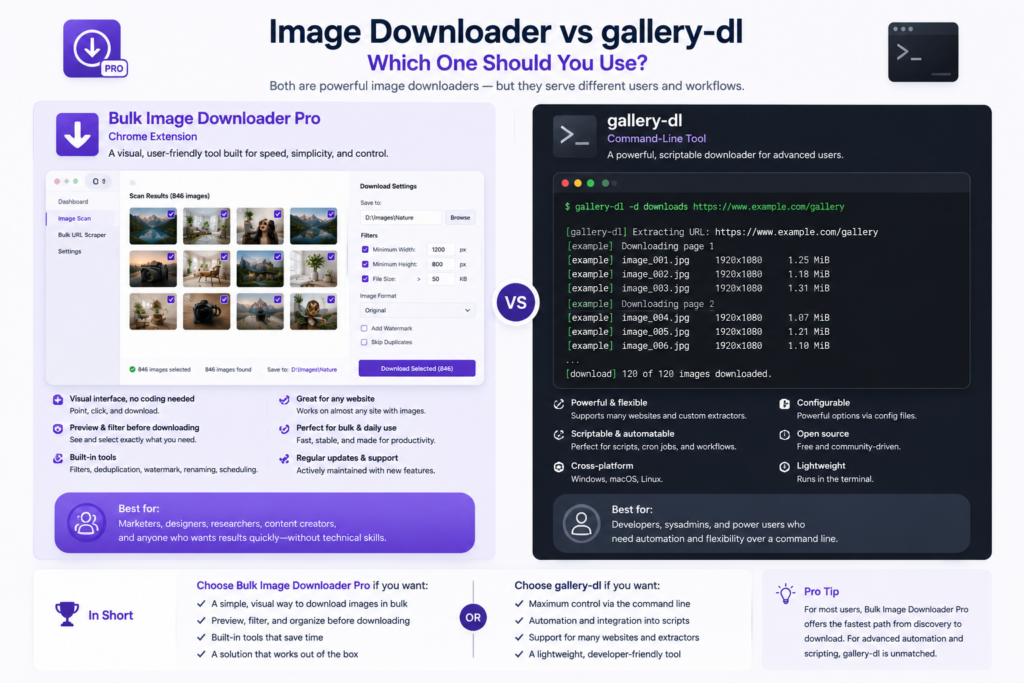
Image downloader vs gallery-dl is a workflow-style choice. gallery-dl is a Python command-line downloader with site-specific extractors and JSON config files. Bulk Image Downloader Pro is a Chrome extension you operate visually inside the browser.
gallery-dl is excellent when you already live in a terminal and want scripted, repeatable runs on supported sites. A browser tool fits when you want to preview, filter, and shape images before they save, without maintaining config files.
What gallery-dl does well
- downloads image galleries from hundreds of supported websites via built-in extractors
- runs from the terminal with JSON configuration you can version-control
- slots into cron jobs, Python pipelines, and headless servers
- stores metadata alongside media when an extractor supports it
- handles authentication cookies for sites that require login (you manage credentials)
When a site changes its structure, extractor updates may be required. That maintenance is the trade-off for deep CLI automation on supported hosts.
What a browser image extension adds
- Deep Scan, Area Scan, and Continuous Scanning on arbitrary pages, not only pre-built extractors
- grid and table previews with dimension, type, aspect-ratio, and domain filters
- perceptual duplicate finder plus 404 and redirect checkers
- on-download resize or convert (JPEG/WebP/PNG), EXIF strip, PNG watermark (PRO)
- Saved Rules with custom CSS selectors, scraper sessions, and task CSV export
You see the captured set before download, which matters when you are curating, not just bulk-fetching.
Comparison table
| Need | gallery-dl | Browser image extension |
|---|---|---|
| Terminal automation / cron | Yes | Limited (saved tasks) |
| Supported-site extractors | Yes | No (general page scan) |
| Visual preview and filtering | No | Yes |
| Arbitrary website without extractor | Depends on site | Yes |
| On-download resize / convert | No | Yes (PRO) |
| Visual duplicate detection | No | Yes |
Choose by interface and source
Pick gallery-dl for scripted downloads from supported sites where config files and terminal control are assets.
Pick Bulk Image Downloader Pro when you need a visual workflow across general web pages with filters, naming, and optional processing in one pass.
Many people use both: gallery-dl for automated archival on known platforms, a browser tool for ad hoc gallery work elsewhere.
Install Bulk Image Downloader Pro for no-code web image workflows.
Continue reading: Build Your Own Image Scraper.
Get Bulk Image Downloader Pro on the Chrome Web Store, watch the tutorial video, or visit our YouTube channel for more downloader comparisons.