
Image Downloader vs JDownloader — Bulk Image Downloader Pro
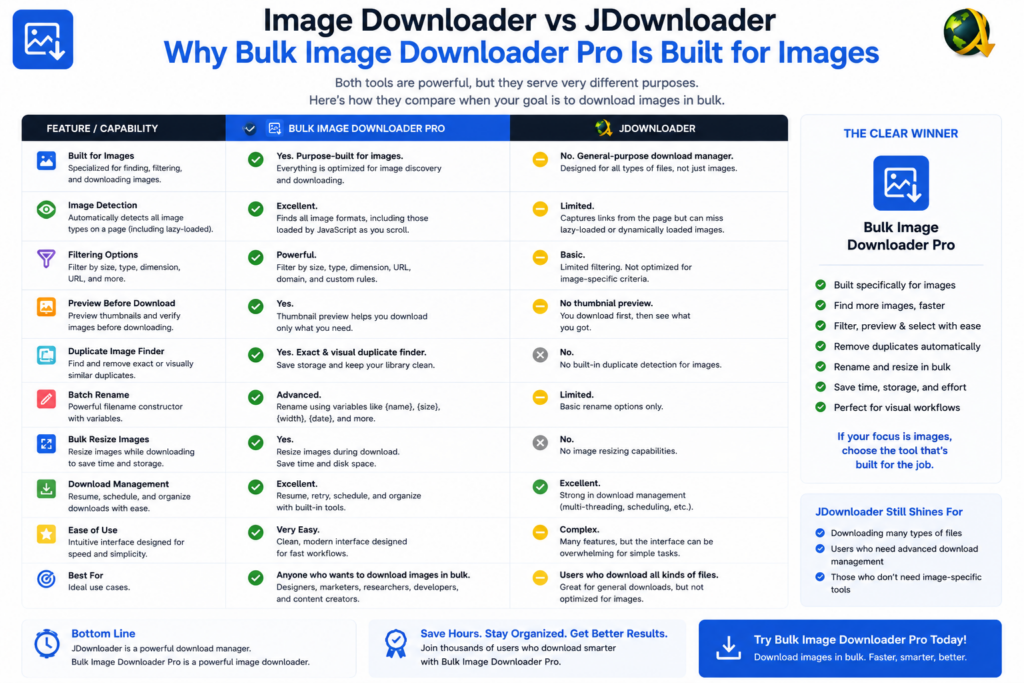
Image downloader vs JDownloader is a category match question. JDownloader is a desktop download manager for queues, link grabbing, archives, and mixed file types from many hosters. Bulk Image Downloader Pro is a Chrome extension that discovers images inside web pages and shapes them before download.
JDownloader excels when you already have direct download links. An image extension excels when pictures are embedded in pages behind scroll, pagination, or lazy loading.
What JDownloader is built for
- desktop app with download queues independent of the browser
- link grabbing from clipboard or browser integration
- support for file hosters, containers, and mixed media types
- CAPTCHA and reconnect handling on supported hosts (feature set varies by version and plugins)
- large batch downloads when URLs are already known
That breadth suits torrents, archives, videos, and hoster links. Image-specific filters, visual deduplication, and on-download resize are outside its core purpose.
What an in-browser image tool adds
- Deep Scan and Area Scan capture images the page has not fully rendered yet
- side-panel pagination and Bulk URL scrape for multi-page catalogs
- filters for dimensions, file type, aspect ratio, and URL text
- perceptual duplicate finder plus 404 and redirect checkers
- filename constructor, auto folders, Download If URL rules, per-task ZIP
- on-download resize or convert, EXIF strip, PNG watermark (PRO; mutually exclusive per task)
Because the extension runs inside your logged-in Chrome session, it can scan pages that only show images after authentication. You are not copying URLs into a separate app and hoping the session still works.
Comparison table
| Task | JDownloader | Browser image extension |
|---|---|---|
| Queue known direct links | Yes | Yes (URL lists) |
| Mixed file types / hosters | Yes | Images only |
| Discover images inside a page | Limited | Yes (Deep Scan) |
| Lazy-load / paginated galleries | Manual | Built-in |
| Visual dedupe + link checkers | No | Yes |
| On-download image processing | No | Yes (PRO) |
Pick by where the work starts
Use JDownloader when links are already in hand and file types are mixed.
Use Bulk Image Downloader Pro when the job starts on a webpage and the deliverable is a curated image set with consistent names and optional processing.
Keeping both is common: JDownloader for hoster links, an image extension for gallery pages.
Install Bulk Image Downloader Pro when images must be found and finished inside the browser.
Continue reading: Bulk Download Images Instead of Save Image As.
Get Bulk Image Downloader Pro on the Chrome Web Store, watch the tutorial video, or visit our YouTube channel for more downloader comparisons.