
Image Scraper vs Save All Resources — Bulk Image Downloader Pro
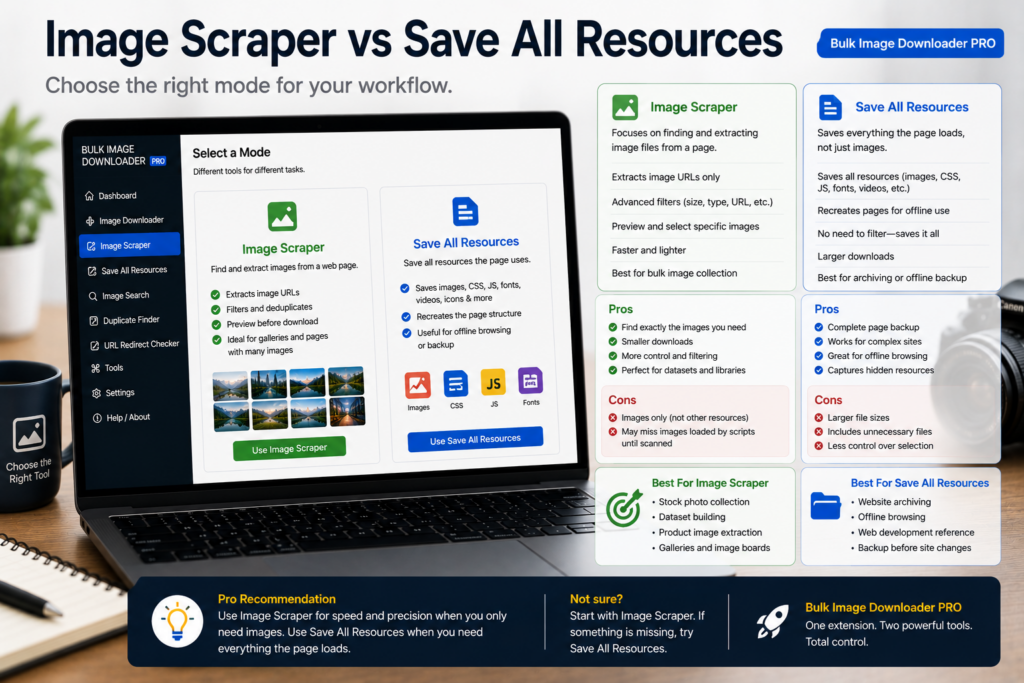
A front-end developer debugging a layout wants every CSS file, font, and script the page fetched. A merchandiser wants two hundred product photos, consistently named and sized. Those are different deliverables, and that is the core of image scraper vs Save All Resources.
Bulk Image Downloader Pro is an image-focused scraper and download workflow tool. It is not a replacement for Save All Resources-style extensions that mirror a page’s full network activity.
What Save All Resources-style tools do
Extensions in this category export assets the browser already downloaded for a loaded page:
- images, scripts, stylesheets, fonts, and other files
- often preserving folder structure from DevTools-style listings
- excellent for archiving one page or debugging what a site served
They are asset dumps, not image curation pipelines. A stylesheet and a hero JPEG are equally in scope.
Limits of resource savers for image jobs
- anchored to one loaded page at a time
- cannot see images that never requested because scroll did not reach them
- no image dimension filters, filename templates, or visual deduplication
- no on-download resize, convert, or watermark workflow
You get a faithful snapshot of one page’s traffic, which is right for archiving and wrong for building a clean product image set.
What an image scraper optimizes for
Bulk Image Downloader Pro finds and shapes pictures:
- Deep Scan captures lazy-loaded and infinite-scroll images
- Bulk URL scrape processes many page URLs from a list
- side-panel filters for size, type, aspect ratio, and domain include/exclude
- Stack Mode merges multi-page results
- saved rules, sessions, and CSV export of scrape results
- options-page tasks with Download If URL rules, auto folders, and filename constructor
- on-download resize, convert (JPEG/WebP/PNG), optional EXIF strip, PNG watermark (PRO)
- perceptual duplicate finder after collection
Comparison at a glance
| Goal | Save All Resources style | Image scraper (this extension) |
|---|---|---|
| Export all page assets | Yes | No (images focused) |
| Crawl many page URLs | No | Yes |
| Lazy-load image capture | Limited | Deep Scan |
| Filter and rename images | No | Yes |
| On-download processing | No | Yes (PRO) |
| Visual duplicate removal | No | Yes |
Match the tool to the deliverable
Use a Save All Resources-style extension when you genuinely need every asset from one loaded page.
Use an image scraper when the output is a curated photo set across pages, filtered and named for downstream use.
Many teams keep both: resource savers for debugging, image scrapers for content production.
Install Bulk Image Downloader Pro when pictures, not every network file, are the product.
Continue reading: Image Downloader vs Bulk Media Downloader.
Get Bulk Image Downloader Pro on the Chrome Web Store, watch the tutorial video, or visit our YouTube channel for more scraper comparisons.