
Image Scraping vs Octoparse — Bulk Image Downloader Pro
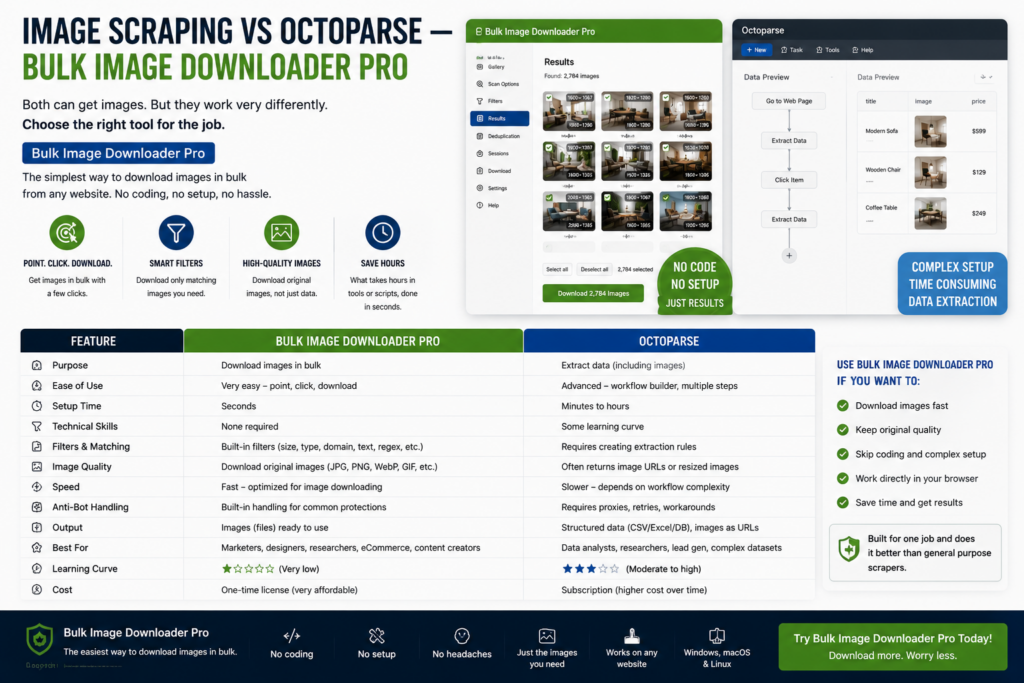
Image scraping vs Octoparse is a category comparison, not a feature checklist race. Octoparse is a visual web-scraping platform for structured data at scale. Bulk Image Downloader Pro is a Chrome extension built around finding, filtering, and downloading image files inside the browser.
If your deliverable is a spreadsheet of prices, SKUs, and metadata across thousands of rows, Octoparse is the right tool class. If your deliverable is a folder of renamed, deduplicated photos, an image-focused extension is usually faster.
What Octoparse is built for
Octoparse targets general data extraction:
- point-and-click field mapping on listing and detail pages
- pagination, loops, and workflow logic for large catalogs
- export to Excel, CSV, databases, or APIs on paid plans
- scheduled or cloud runs for recurring jobs (plan-dependent)
Image URLs can appear as one column in a dataset. Octoparse is not centered on aspect-ratio filters, perceptual deduplication, or on-download resize and watermarking. You would typically fetch and clean images in a second step.
What a browser image extension adds for pictures
- Deep Scan, Area Scan, and Continuous Scanning for lazy-loaded galleries
- side-panel pagination (auto-detect or manual page ranges, up to 100 pages)
- Bulk URL scrape across pasted page URLs
- filters for dimensions, file type, aspect ratio, URL text, and domain include/exclude
- perceptual duplicate finder plus 404 and redirect checkers
- on-download resize or convert (JPEG/WebP/PNG), EXIF strip, PNG watermark (PRO; mutually exclusive per task)
- saved tasks, Download If rules, auto folders, and filename constructor tokens
Comparison table
| Need | Octoparse | Browser image extension |
|---|---|---|
| Multi-field structured datasets | Yes | No |
| Finished image files with filters | Secondary step | Yes |
| Visual no-code setup in browser | Desktop/cloud app | Yes (side panel) |
| Cloud scheduling at large scale | Yes (plans vary) | Queued tasks; Chrome must stay open |
| On-download image processing | No | Yes (PRO) |
| Visual duplicate detection | No | Yes |
Choose by deliverable
Pick Octoparse when the product is structured records across many fields and pages, and you accept workflow setup time.
Pick Bulk Image Downloader Pro when pictures are the product and you want capture, filtering, naming, dedupe, and processing in one browser workflow.
Many teams use both: Octoparse for catalog data, an image extension when the handoff is visual assets rather than rows.
Install Bulk Image Downloader Pro when images, not database columns, are what you ship.
Continue reading: Image Downloader vs Web Scraper IO.
Get Bulk Image Downloader Pro on the Chrome Web Store, watch the tutorial video, or visit our YouTube channel for more scraping comparisons.