
Find Duplicate Images With Sensitivity Settings — Bulk Image Downloader Pro
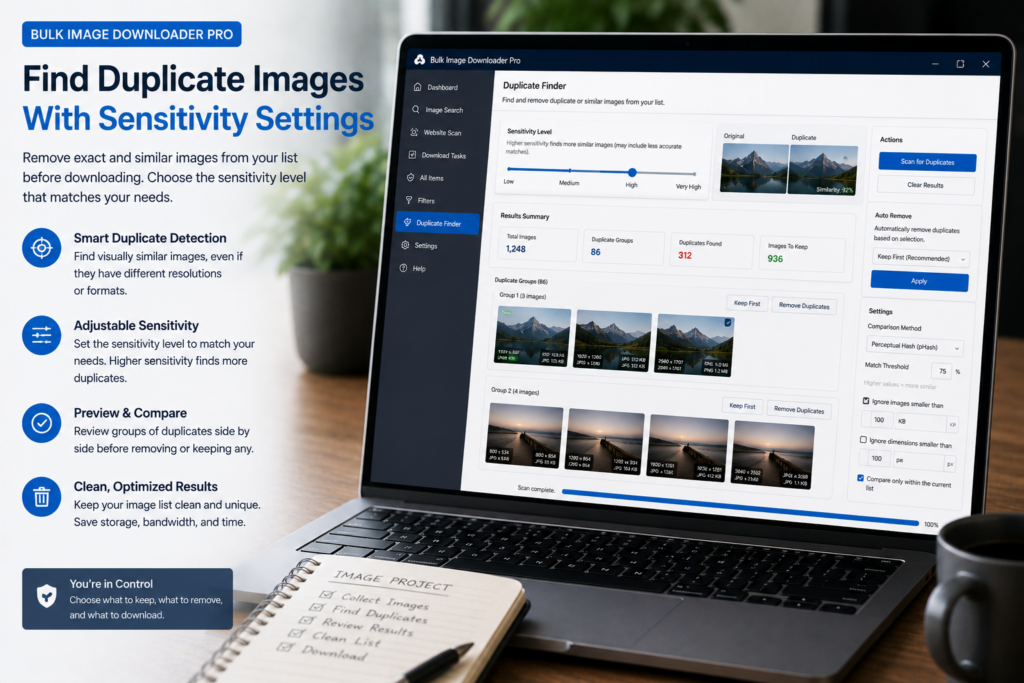
Every duplicate finder walks a line between too picky and too loose. Miss obvious copies and your list stays cluttered. Merge distinct photos and you lose shots you needed. The fix is to find duplicate images with sensitivity settings that match the stakes of your batch.
On the Duplicate Finder tab in Bulk Image Downloader Pro, the Sensitivity dropdown offers three presets. Each shifts how forgiving the combined visual score must be before two images land in the same group. You are choosing temperament, not editing raw math by hand.
The three presets
- Strict — groups only very close visual matches. Fewer duplicate sets, lower risk of false positives.
- Balanced (Default) — the sensible starting point for mixed image sets.
- Aggressive — tolerates more visual difference, catching looser near-duplicates at the cost of occasional over-grouping.
Under the hood each preset adjusts the weighted similarity threshold and fallback hash/color gates used during scoring. You do not need to touch those numbers unless you want finer control later.
When to choose Strict
Pick Strict when a wrong merge is expensive:
- product catalogs where similar angles are different SKUs
- photo series where small composition changes matter
- archival or legal sets where each file must stand alone
Strict keeps distinct images apart. You may leave a few loose duplicates for manual review, but you avoid merging cousins you meant to keep.
When Aggressive helps
Aggressive suits cleanup jobs where near-duplicates are all junk anyway:
- the same hero image saved at multiple resolutions
- JPEG plus WebP copies of one asset
- CDN variants that are visually identical
Review groups before removing URLs. A wide net can occasionally pull in look-alikes you still wanted.
Start on Balanced, then adjust
Most batches should begin on Balanced. Run Scan for Duplicates, skim the groups, and switch only if the first pass clearly errs:
- two near-identical product angles merged? step down to Strict
- obvious re-saves still separate? step up to Aggressive
Your choice is saved in browser storage so the next scan remembers it.
Presets are the broad dial; weights are the fine dial
Sensitivity sets the overall strictness. If Balanced is close but color-heavy images over-group, open Weight tuning, nudge individual signal sliders, and click Re-apply without a full rescan. Read tune visual duplicate image detection for that workflow.
For the full signal list behind the presets, see find visually duplicate images.
Pair sensitivity with keep rules
Sensitivity decides what counts as a duplicate. The Keep Rule decides which copy survives in each group: largest resolution (default), first detected, smallest, shortest URL, or manual per group. After grouping looks right, apply keep rules and remove non-kept URLs from tasks.
Install Bulk Image Downloader Pro, start on Balanced, and let sensitivity settings do the first-pass judgment your eyes would otherwise repeat image by image.
Continue reading: Tune Visual Duplicate Image Detection.
Get Bulk Image Downloader Pro on the Chrome Web Store, watch the tutorial video, or visit our YouTube channel for more sensitivity tips.