
Check Image URLs Before Download — Avoid Dead Links and Redirect Surprises
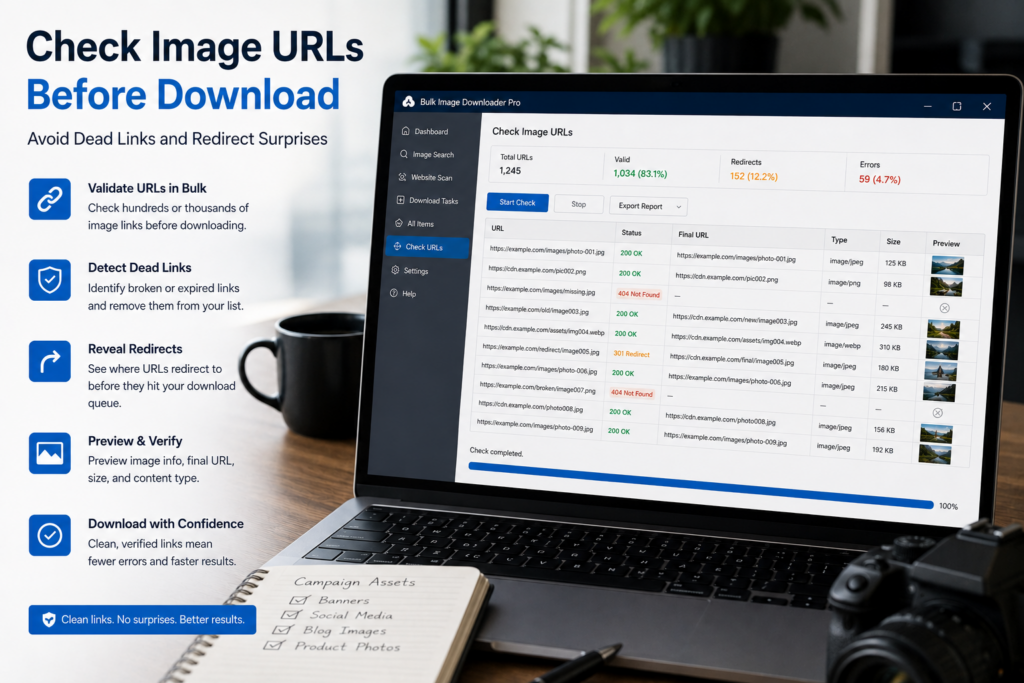
A large image download is only as good as the URL list behind it. If the list contains dead links, expired sources, redirects, or non-image URLs, the task will waste time before you know what went wrong.
It is better to check image URLs before download, especially when the list came from an old CSV, a scrape, a supplier feed, or another person’s spreadsheet.
Use the 404 Checker for reachability
The Image URL 404 Checker lets you paste URLs and test whether they resolve as valid image links or fail as unreachable/non-image content. It uses fast checks and falls back where needed, then separates reachable and unreachable results.
This does not guarantee every future download will succeed. A site can still expire a URL, block hotlinking, or change access rules. But it gives you a cleaner starting list than guessing.
Use the Redirect Checker for final destinations
Some image URLs bounce through redirects before reaching the final file. The Redirect Checker follows the chain and reports where each URL ends up.
That is useful when you want to normalize old links, inspect CDN paths, or avoid handing someone a list that sends them through unnecessary redirect chains.
Clean the list before creating the task
After checking, copy the reachable URLs into a clean task. Remove obvious failures, review final URLs when redirects matter, and dedupe repeated links before starting the download.
This is especially valuable for unattended or large batches. A few minutes of URL cleanup can save a long failed run.
When link checking matters most
Check first when you are reusing an old export, importing many direct image URLs, handing a list to a teammate, or working with pages that change often. Marketplaces, social feeds, news sites, and temporary CDN URLs can go stale quickly.
If the list contains page URLs rather than direct image URLs, scan or scrape those pages first, then check the image URLs that were actually found.
A simple preflight workflow
Paste the image URLs, run the 404 Checker, run the Redirect Checker if redirects matter, copy the clean list, dedupe it, then build the download task. You start with fewer surprises and a clearer idea of what will need manual review.
Continue reading: strip EXIF metadata from images.
When this becomes a regular task, Bulk Image Downloader From URL List keeps the URL list, filters, and settings in one place in Chrome.
Why the 404 checker runs as its own window
The link tools do not sit inside the download card. In the extension, Check redirects and Find broken links open in their own window, separate from the download you are building. That is what makes preflight cheap: you paste the raw list, get a pass-or-fail picture, and keep the download task untouched until the list is clean. Because the same link is never kept twice inside one download, any duplicate that survives the clean-up is simply ignored when you paste it. The check is optional — it is preparation, not a required step before a save.
Filtering, renaming, and saving all happen in the same browser session, with no separate app to open.