
Best Parallel Download Setting
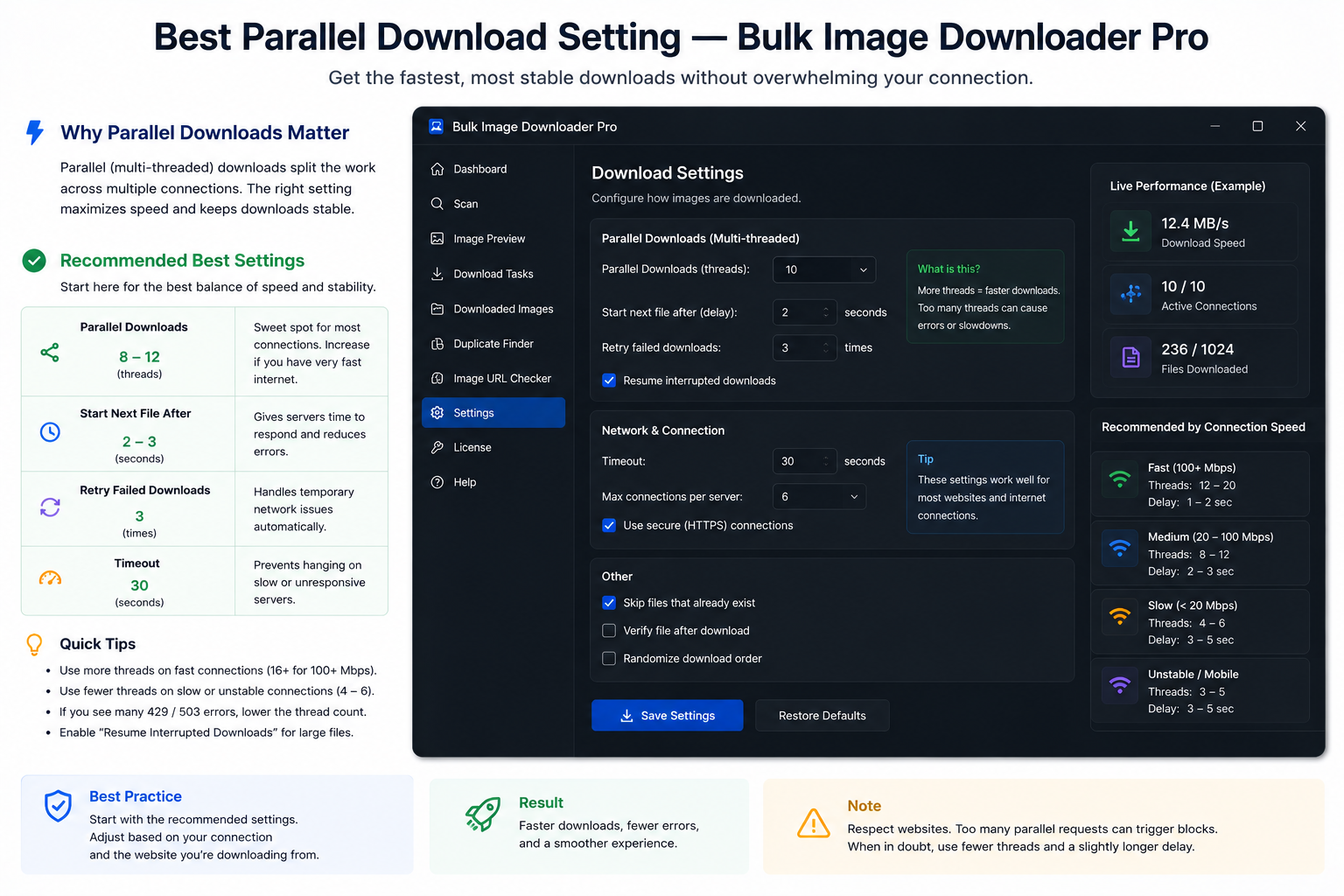
Raising concurrency feels like free speed until the tab stutters, servers start failing requests, and you re-run half the batch. The best parallel download setting is the highest number your connection and the remote host tolerate without errors, not the maximum on the slider.
On the options page in Bulk Image Downloader From URL List, Parallel Downloads sets how many files fetch at once during a download. Licensed PRO allows 1—100. Try PRO and Basic tiers enforce lower caps until you purchase a license.
Start at 5—10, then step up
Most jobs should begin in the 5—10 range. That keeps the connection busy without hammering a single host. Run a batch, watch for failures or stalls, then increase by a small step only if everything stayed clean.
The essential info bar shows your current parallel count so you can confirm the value before Save & Download.
Signals you went too high
- failed or stuck downloads appearing mid-batch
- HTTP errors that look like rate limiting or hotlink blocks
- browser tab lag, high memory use, or UI freezes
When any of those show up, lower parallel downloads until the batch runs reliably. A moderate setting that finishes once beats a aggressive one that forces a restart.
Pair higher concurrency with ZIP mode
For large jobs, enable the per-task ZIP checkbox so files bundle into one archive instead of hundreds of simultaneous individual saves. The UI tip is explicit: higher parallel counts plus loose files can stress the browser; ZIP mode reduces that pressure.
ZIP packaging is optional per task. Use it when batch size or concurrency is high enough that tab stability matters.
Queued mode is separate
Queued Download controls whether multiple tasks run one after another. Parallel Downloads controls concurrency within a running download. Check both on the essential info bar before a big session.
Resize/convert worker concurrency (1—15 per task) is a different control for on-download image processing. Do not confuse it with network parallel downloads.
Tune for the source, not once forever
A tolerant CDN may handle more concurrency than a small site with strict rate limits. A fast connection does not help if the remote server is the bottleneck. Pick a setting per job, note what worked, and reuse it for similar sources.
For broader context, read parallel downloads explained. For tab stability on huge lists, see avoid browser crash on large downloads.
Install Bulk Image Downloader From URL List and treat parallel count as a dial you adjust, not a badge to max out.
Continue reading: Avoid Browser Crash on Large Downloads.
Get Bulk Image Downloader From URL List on the Chrome Web Store, watch the tutorial video, or visit our YouTube channel for more concurrency tips.