
Remove Duplicate Image Downloads — Exact Links vs Visual Matches
Start with exact URL duplicates
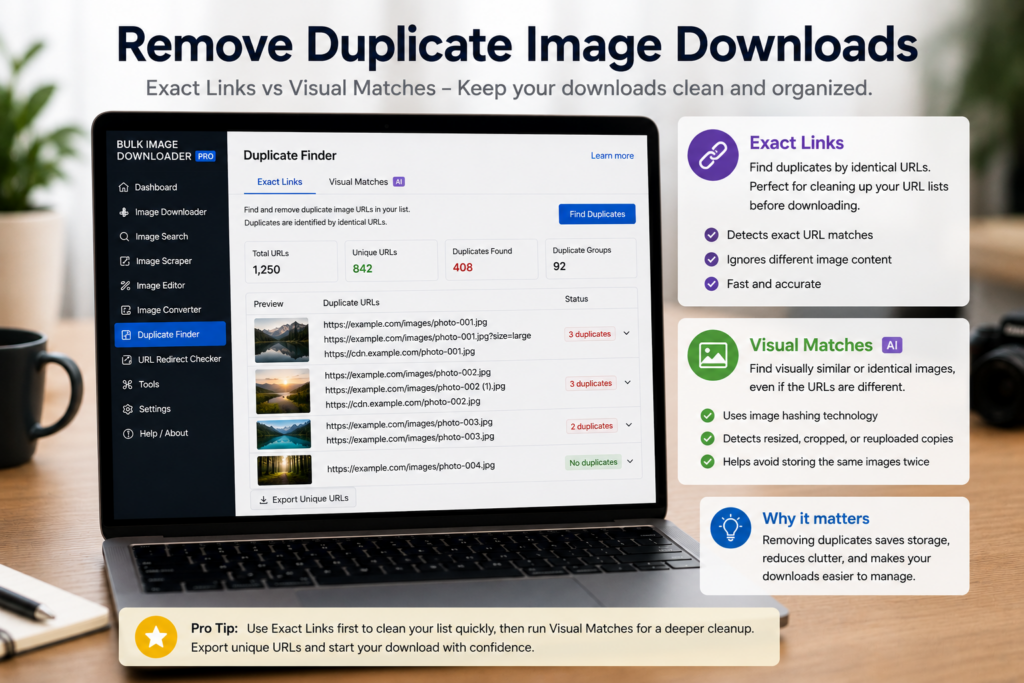
Exact URL deduplication is the first pass. If the same image URL appears multiple times in a scan or URL list, removing repeated links is fast and low-risk because the duplicate entries point to the same source. Use this before creating the final task or before deeper review. It reduces clutter without asking the extension to judge whether two different files are visually similar.Use visual duplicate review for near-matches
Near-duplicates are harder. A product photo may exist as JPG and WebP. A gallery may include the same shot cropped slightly differently. A CDN may serve a resized copy at a different URL. The Perceptual Duplicate Finder compares visual similarity rather than URL text. It can group likely matches, let you tune sensitivity and weights, and apply keep rules. Treat those groups as review suggestions, not final truth. Visual matching can miss duplicates or flag images that only look similar.Review before removing
This matters most for catalogs, datasets, and photography work. Two images can be visually close but still intentionally different: variant colors, alternate crops, before/after states, or product angles. Use preview groups, compare dimensions and formats, and export or copy duplicate URLs when you want a record before changing the task list.A practical dedupe workflow
Strip exact URL duplicates first. Then run visual duplicate review on the smaller set. Review the groups, choose keepers, remove only the entries you are confident about, and download the cleaned task. That approach keeps the fast, safe cleanup separate from the slower judgment-based review.For a broader comparison, see our roundup of best bulk image downloader extensions.
Continue reading: download images from multiple URLs. Get Bulk Image Downloader From URL List on the Chrome Web Store, watch the tutorial video, or visit our YouTube channel for more image download workflows.Repeat the work often? Bulk Image Downloader From URL List holds the URL list, filters, and settings in a single Chrome workflow.
Fix exact duplicates first
Exact URL duplicates are the easy half. If the same image URL appears twice in a list, removing the repeat is fast and safe, because both entries point at the same source. Do that before any visual review, so the harder pass is working on a smaller set.
Treat visual matches as suggestions
Near-duplicates are a judgement call. The same photo may exist as JPG and WebP, or as two crops of one shot, or as a resized copy at a different URL. The perceptual duplicate finder groups likely matches and lets you tune sensitivity, but the groups are review suggestions. Keep rules decide what actually goes, so a near-match you still need is never removed silently.
Tune the sensitivity before you trust a group
Visual matching has a threshold. The finder lets you adjust sensitivity and weighting, and the right setting depends on your material. Start conservative, review the groups it produces, and tighten only when it is clearly missing twins rather than inventing them.