
Free vs Paid Image Downloader Tools — What Do You Actually Need?
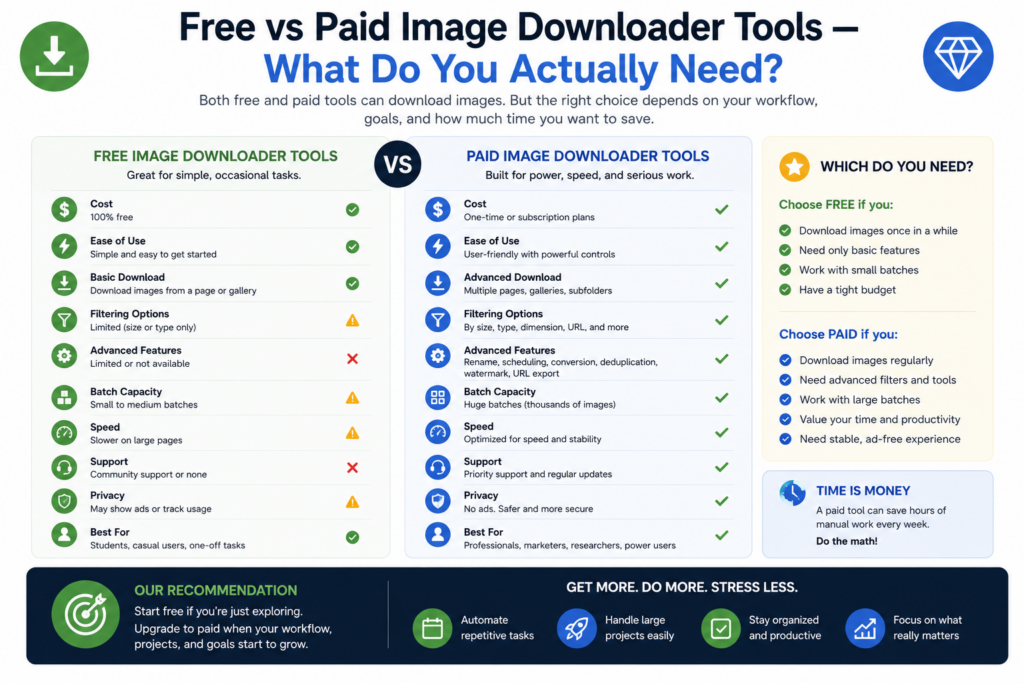
Free vs paid image downloader tools is not a simple argument about whether paid is always better. A free tool can be enough for quick page saves. A paid tool starts to make sense when the work becomes repeatable, larger, or harder to clean up after download.
The right question is: what ceiling are you actually hitting? URL count, processing, duplicate review, naming rules, task reuse, CSV import, or support?
When a free downloader is enough
A free image downloader is often fine when you only need a few images from the current page, you do not care about advanced naming, and you are happy to clean up the folder yourself afterward. For occasional personal use, a lightweight current-page downloader can be the right choice. In Bulk Image Downloader From URL List, Basic (Free) is meant for simple direct downloading. It is not the full toolkit. That distinction matters because free access should not be confused with unrestricted advanced workflow features.What paid or PRO features usually add
Paid image downloader tools usually become valuable when they save repeated manual cleanup. In Bulk Image Downloader From URL List, the bigger workflow lives in Try PRO and Licensed PRO: task settings, advanced filtering, watermarking, duplicate review, processing, scheduling-style controls, and more complete task workflows. Try PRO lets users test the full feature experience but caps actual task downloads to a very small sample. Licensed PRO removes the practical caps for real production use, including larger URL lists per task and bulk CSV import workflows.Look for the real limit
Before paying for any tool, identify the exact limitation:- URL volume: do you need one or two images, or hundreds across tasks?
- Repeatability: do you rebuild the same settings every week?
- Output control: do files need consistent folders, ZIPs, or filenames?
- Processing: do you need resize, convert, EXIF cleanup, or watermarking?
- Cleanup: do you need preview filtering or duplicate review before saving?
- Team workflow: do you need CSV export/import or repeatable task templates?
Free does not always mean simpler
A free tool can still cost time. If every download ends with renaming files, deleting thumbnails, sorting folders, checking broken URLs, and removing duplicates, the hidden cost is in the cleanup. A paid workflow is worth considering when it prevents that cleanup before files hit disk. That is the main value of a tool like Bulk Image Downloader From URL List: not just grabbing images, but shaping the batch into a usable folder with filters, naming, tasks, and review tools.A practical upgrade rule
Start with the free or trial workflow and use it on real jobs. Keep track of the moments where the tool blocks you: a URL cap, a task you cannot import, a duplicate cleanup step you cannot run, or a processing setting you need repeatedly. Upgrade only when the same limit appears more than once. That way, paid software is not a guess. It is a response to a real workflow ceiling.Widening the search?Widening the search? best bulk image downloader extensions lists other tools worth testing.
Continue reading: image downloader vs screenshot tools.