
Is Bulk Image Downloader From URL List Free?
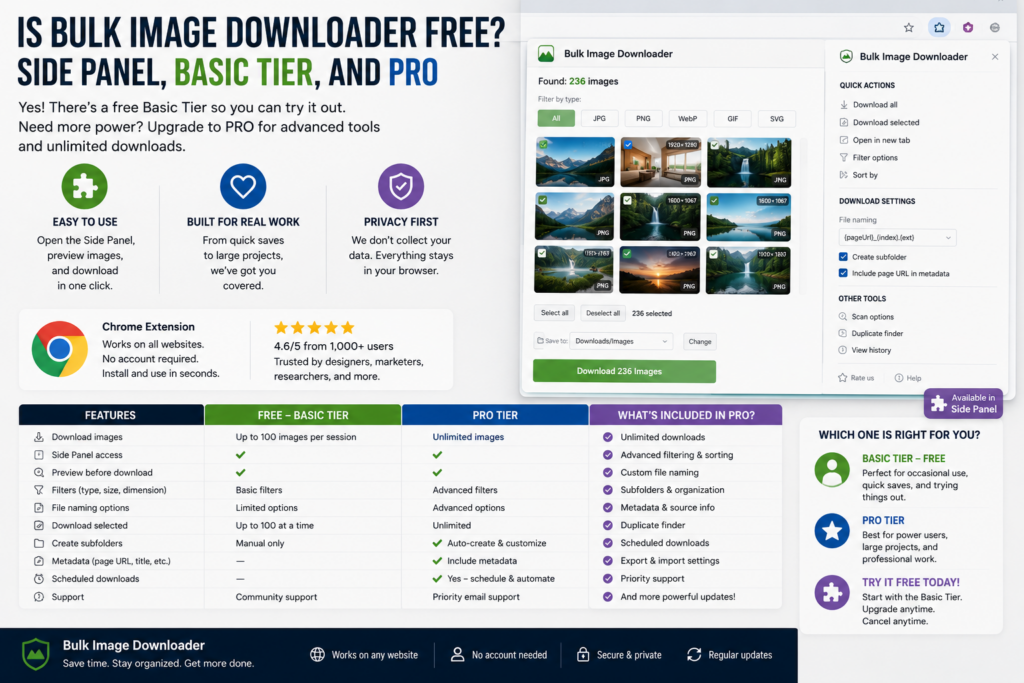
Is Bulk Image Downloader From URL List free? Yes — you can start with the free tier. PRO is the paid plan when you need the full feature set.
The short answer is yes, partly. You can use Bulk Image Downloader From URL List without paying for two different jobs: discovering images in the side panel and downloading from URL lists on the Basic (Free) tier. The longer answer depends on whether you only need raw files or the full options-page pipeline.What is free without a license
- Side panel scraping: scan pages, filter results, and export URLs without tier restrictions on scraping itself.
- Basic (Free) downloads: paste or load URL lists and run Save & Download with no cap on URL count or image count in a task.
What is not included in Basic (Free)
Advanced options-page controls stay locked in Basic (Free), including:- Task filters, filename rules, and folder naming
- Resize, convert, EXIF cleanup, and PNG watermarking
- Duplicate review and URL validation tools
- CSV task import (Licensed PRO)
Try PRO lets you test PRO features free
Try PRO unlocks the full feature set with one limit: one URL per download task. It is the practical way to test whether filters, naming, and processing are worth a license on your own pages.Licensed PRO is for unrestricted bulk tasks
Licensed PRO removes the one-URL Try PRO cap and supports large multi-URL tasks, including CSV import for repeatable setups. Free collection and paid polish solve different problems. Pick the tier that matches the cleanup work you want the extension to handle.The full walkthrough is in how to bulk download images from a URL list.
Continue reading: Bulk Image Downloader From URL List features.What a guest purchase includes
You do not have to sign in before buying. A guest purchase creates an account from the name and email you enter at checkout, and the license shows up in the extension afterwards. Signing in is only used to check your license, not to record what you download.
What stays free after the trial
If you stop using PRO, the free tier does not disappear. Side-panel scanning, filtering, exporting URLs, and URL-list downloads still work under Basic (Free). What you lose is the processed output: resize, convert, EXIF cleanup, watermarking, filename rules, and folder naming on tasks. Pieces of work you already saved stay on your machine.
What no cap means in Basic (Free)
Free downloads are not limited by count. You can paste a long URL list and run a task without a cap on how many URLs or images it contains. What Basic does not include is the processed output and more than one download, so a large raw collection is a size question rather than a licence question.