
Save Website Image Scraping Rules for Repeat Jobs
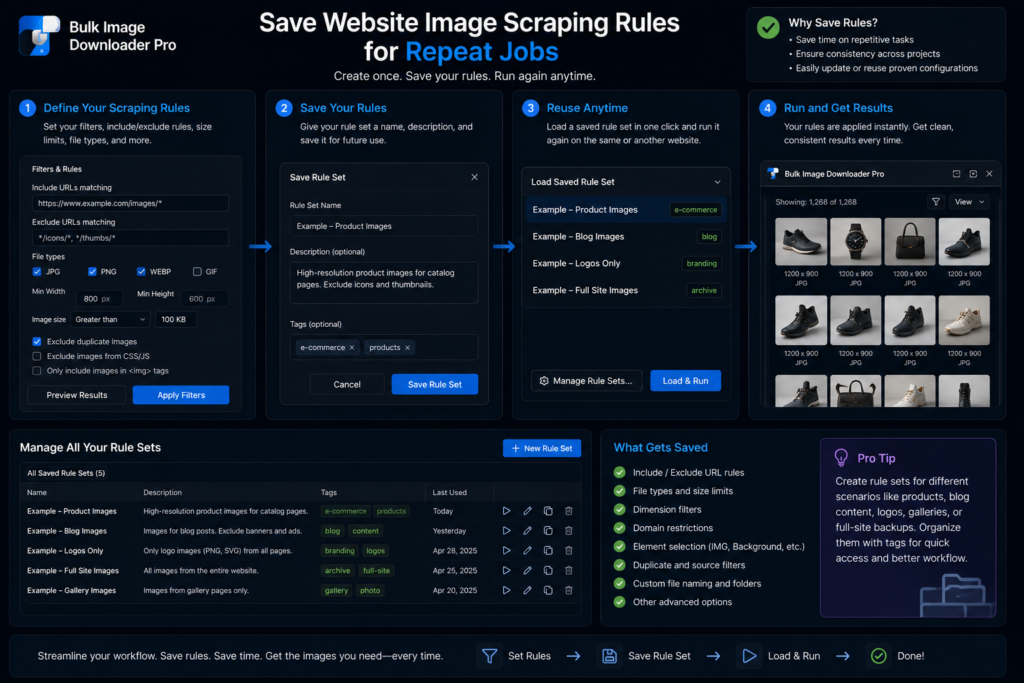
Repeat image collection gets tedious when every visit starts from zero. You remember the site, but not the exact filters, selector, pagination settings, or scan setup that worked last time.
Bulk Image Downloader From URL List lets you save website image scraping rules so repeat jobs start from a known-good setup instead of guesswork.
What saved rules are for
Saved rules are useful when a site has a consistent layout: a product grid, gallery, archive page, category template, or recurring content area. Once you find the right settings, save them so the next visit is faster.
A rule can include useful pieces such as filters, custom CSS selectors, and pagination settings. That helps you target the part of the page that matters instead of scanning and cleaning from scratch each time.
Use CSS selectors carefully
CSS selectors are powerful because they narrow the scan to specific elements. They are also fragile when a site redesigns. Use them for stable areas such as gallery containers, product image blocks, or article image sections.
If a saved rule suddenly stops finding the right images, check whether the site’s markup changed before assuming the extension failed.
Use sessions for results, not just settings
Rules help you repeat the setup. Sessions help you return to saved results. The side panel can save sessions, show history, compare sessions, and export/import session data for later review.
That matters when you are collecting from a changing source. A saved session can show what you found before; a saved rule helps you run the same collection pattern again.
A repeatable scraping workflow
Run the scan, tune filters, add selectors only when they help, configure pagination if needed, save the rule, then save the session when the results matter. On the next visit, apply the rule first and review the results before downloading or exporting URLs.
The best saved rule is not the most complex one. It is the one that reliably gets you close enough that the final review is quick.
Continue reading: bulk image downloader for graphic designers.
What a rule remembers
A saved rule carries the scan setup: your filters, any extra picture locations, and the also scan next pages settings. Save it once and the next visit starts from the setup that worked rather than from the defaults.
Name rules so you can tell them apart
The rule name is free text, and it is worth using. “Pinterest Images” or “Google Images” tells you in a second what the rule is for; an unnamed rule becomes a guess six weeks later when you run three sites that all use a grid.
Keep the extra picture locations short
Extra picture locations are only for pictures the normal scan misses. The field accepts CSS selectors separated by commas, such as .gallery img or img[data-src], and it is optional. Add the smallest selector that fixes the miss rather than a long list of defensive rules. A short rule survives redesigns better, and a long one is harder to debug when a site changes.