
Bulk Image Downloader for Digital Marketers — Build Campaign Asset Packs Faster
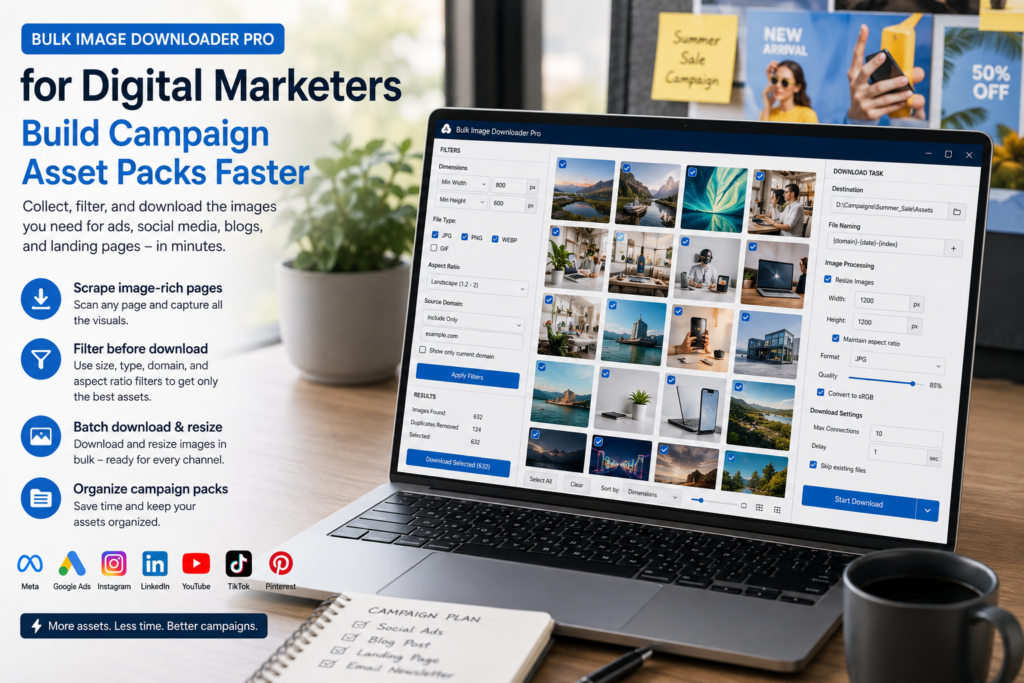
Marketing teams rarely need “all images.” They need the right campaign assets, in the right folders, with names that make sense to designers, agencies, regional teams, and channel owners.
A bulk image downloader for digital marketers should make asset collection faster without turning the final handoff into a mess.
Collect from approved sources
Start with approved brand pages, partner URLs, product pages, or existing campaign archives. Use page scans or URL-list scraping depending on how many sources you have.
Deep Scan can help with browser-visible lazy-loaded galleries, but the workflow should still start with sources you have permission to use. Downloading assets does not create usage rights.
Filter for channel-ready candidates
Use dimensions and aspect ratio filters to match channel needs: square or vertical for social, wide for web heroes, larger originals for creative teams. Use file type and domain filters to keep approved formats and sources.
Preview before downloading so logos, tracking pixels, thumbnails, and unrelated page assets do not end up in the campaign folder.
Organize the handoff
Use task folders for campaigns, channels, regions, or partners. Use the Filename Constructor for campaign tokens, sequence numbers, timestamps, URL fragments, or custom text. ZIP output is useful when the asset pack needs to travel as one file.
Filename cleanup rules can remove source-name clutter before the pack reaches another team.
Process copies deliberately
Use Resize when channel dimensions need to change. Use Convert when the format needs to change. They are separate processing modes, so choose based on the deliverable.
PNG watermarking can help with draft previews when you have a prepared watermark image. Keep originals separate from processed copies so final design work does not depend on a compressed preview.
A repeatable marketing workflow
Collect from approved URLs, filter by size and format, review the grid, save into campaign folders, apply filename rules, ZIP the handoff if needed, and save the task setup for the next campaign. That turns asset gathering into a repeatable process instead of a frantic pre-launch chore.
Continue reading: download real estate images in bulk.
The same approach works here: collect the URLs, filter out what is not needed, then download only the useful files.
Folders carry the handoff
Task folder names are the part a designer or agency actually sees, so name folders for the campaign, channel, region, or partner rather than for the tool. Auto-folders can build subfolders from the URL domain or path when a task pulls from several sources, and the same structure applies whether you save loose files or package a ZIP.
Send a ZIP when the pack travels
A per-task ZIP keeps an asset pack as one file for email, a shared drive, or a brief. Keep the loose-file option when the next step is a local tool that expects a folder. Both follow the same folder logic, so switching between them does not change the structure you set up.
Keep a master set alongside the processed one
Resize and convert change the files a task produces. If a creative team may later need the full-size originals, collect those in a separate task without the processing enabled rather than reprocessing from a downscaled set. It costs one extra run and avoids a rebuild you cannot undo.