
Bulk Image Downloader for SEO Audits — Find Image Issues Faster
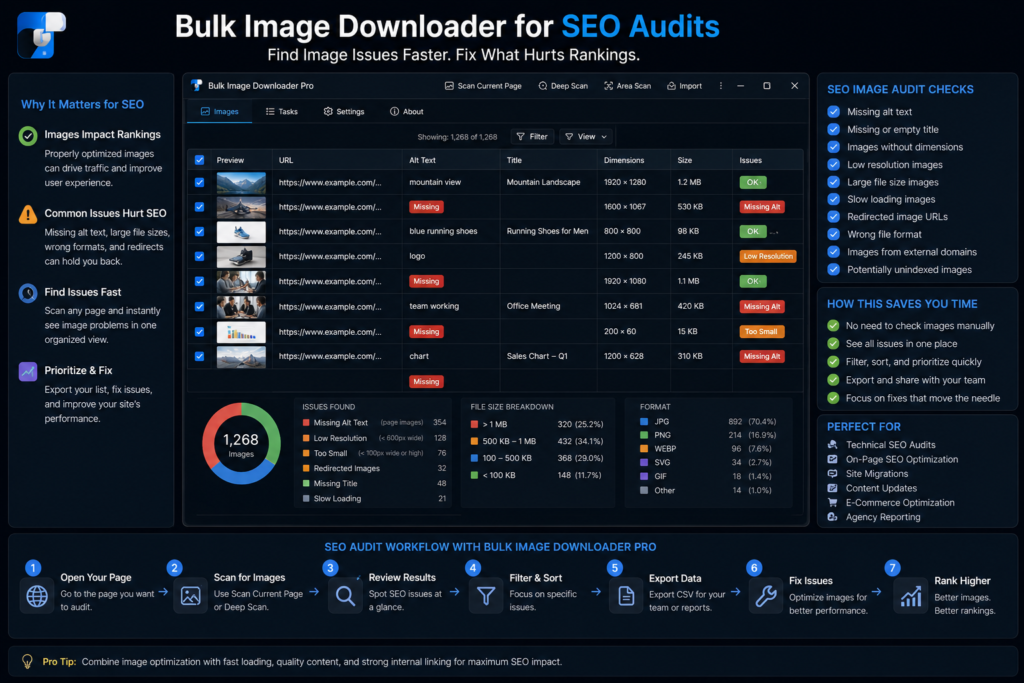
An image SEO audit gets messy when the image list is incomplete. Broken URLs, redirected assets, thumbnails used where full-size images should be, and oversized files are easy to miss if you only inspect a few pages by hand.
A bulk image downloader for SEO audits gives you a practical inventory. You can collect image URLs from pages, review what was found, check problem links, and download the assets that need closer inspection or replacement.
Build an image URL inventory first
Start with the pages you actually need to audit: a template, category, landing page set, blog section, or product collection. In Bulk Image Downloader From URL List, the side panel can scan the current page, use Deep Scan for lazy-loaded images, or work through a list of page URLs with Bulk URL Scraping.
Once the results are visible, export the scraped list to CSV when you need a spreadsheet for review. That gives you a working inventory before you decide which files are worth downloading.
Check broken image URLs
Broken image links create poor user experience and can make pages look neglected. The Image URL 404 Checker lets you paste image URLs and test whether they resolve to valid image content or fail as unreachable/non-image URLs.
This is useful before a migration, after changing CDN rules, or when auditing old pages where image paths may have changed over time.
Trace redirects before cleanup
Redirected image URLs are not always a disaster, but they are worth knowing about. The Redirect Checker follows redirects and reports the final destination, which helps you replace old image references with cleaner final URLs where appropriate.
For SEO work, the goal is not only to download files. It is to understand which image references are stable, current, and worth keeping.
Use dimensions to find likely quality and speed problems
Dimensions are one of the fastest clues in an image audit. Very small images may be thumbnails being used in the wrong place. Very large images may be slowing pages when they are displayed much smaller in the layout.
Use dimension, file type, domain, and text filters to narrow the list. Then download only the subset you need to inspect, resize, convert, or hand to a developer.
A simple audit workflow
Scan or scrape the target pages, export the result list, run the 404 and redirect checkers on suspicious URLs, filter by dimensions and file type, then download the assets that need action. Save sessions or rules when you need to repeat the same audit pattern on another section of the site.
That workflow turns image SEO from a vague checklist into a set of files and URLs you can actually review.
Keeping audit evidence on your machine
An image audit produces files worth keeping, and the extension keeps them local. Downloads, drafts, and AI files stay on this computer, and the service does not record what you download; signing in is only used to check your license. So an inventory exported for a client audit is a local artifact.
That matters for cleanup discipline. Because the files persist locally, an audit folder grows until you clear it, and clearing data only affects the current Chrome profile. On a shared audit machine, each profile keeps its own copies, so one person’s cleanup does not touch another’s evidence.
Continue reading: download gallery images in bulk.