
Bulk Image Downloader for Web Developers — Audit Site Images Before a Migration
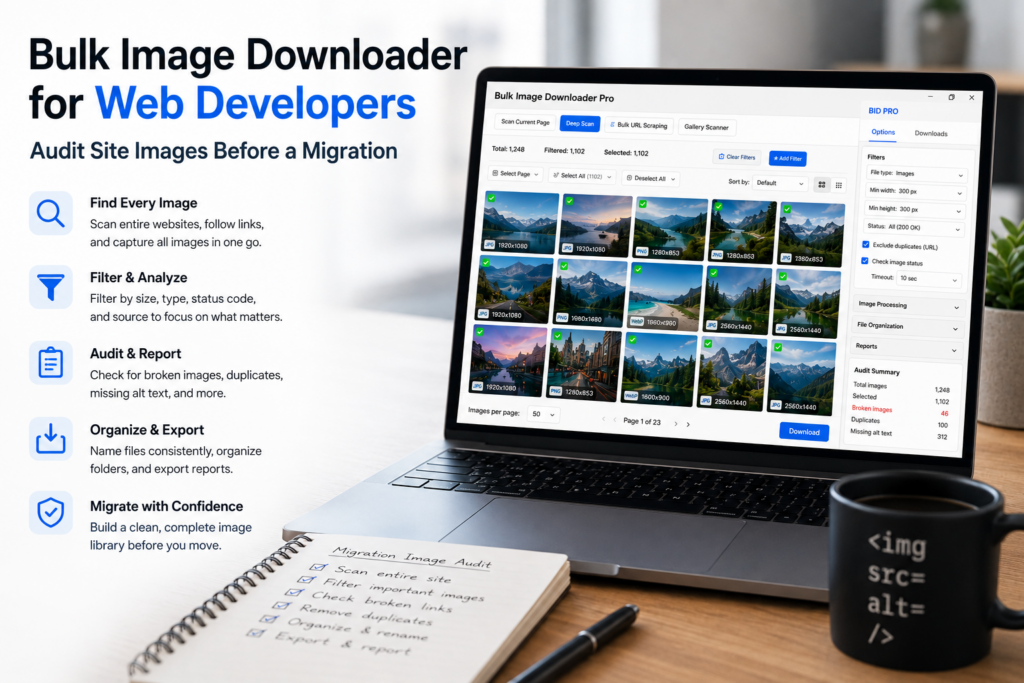
Before a migration, redesign, CDN cleanup, or performance pass, developers need an image inventory they can trust. The problem is that images do not always live in obvious <img> tags.
A bulk image downloader for web developers can help turn a rendered site into a practical asset list for review.
Inventory rendered page images
Use Scan Current Page for simple pages and Deep Scan when images appear after scrolling or lazy loading. For site sections, work from a controlled list of URLs rather than opening pages one at a time.
Export image URLs or scan results to CSV when you need a manifest for migration planning, QA, or performance review.
Look beyond obvious image tags
The side panel can detect more than basic inline images, including browser-visible CSS background images and responsive image sources when the page exposes them. Area Scan is useful when auditing one component or section.
No tool guarantees every hidden asset. Canvas rendering, blocked files, different breakpoints, scripts, or assets that never load in your browser can still require manual inspection.
Check URLs before launch
Use the 404 Checker to find broken or non-image URLs. Use the Redirect Checker to trace final destinations and catch old paths, CDN redirects, or migration leftovers.
These checks are good preflight evidence, not a substitute for full QA. They help you decide which assets need fixing before users or crawlers find the issue.
Review formats and dimensions
Filter by file type to see where JPG, PNG, WebP, GIF, or SVG assets appear. Use dimension filters to find oversized originals, tiny placeholders, and files that do not match the layout’s needs.
Use Convert or Resize on copies when testing output changes. Keep source assets separate from processed experiments.
A developer audit workflow
Scan representative pages, export the URL manifest, check broken links and redirects, filter by type and dimensions, review CSS backgrounds where relevant, and save sessions or rules for repeat audits. That gives you a practical image inventory before the deployment window gets stressful.
Continue reading: bulk image downloader for content creators.
What the 404 checker actually verifies
The 404 checker does more than confirm a URL loads. It checks the response Content-Type and tells you whether the result is a real image format, so a URL that returns a 200 HTML error page is reported instead of counted as a valid asset. For a migration inventory, that is the difference between a list of links and a list of images.
Trace the redirect chain, not just the endpoint
The redirect checker follows each URL and shows the chain it took, not only where it ended. On a migration that matters twice over: a single hop is fine, a chain of three is a performance problem, and a redirect that lands on a 404 is a broken asset that still looks healthy in a spreadsheet.
Back up the inventory before you start
Export the scan to CSV and save the session. The CSV is the manifest you will diff after the change, and the session lets you compare the list you captured today with the one you capture after the redesign. Both live on your machine, so export them before you clear anything.