
Bulk Image Downloader vs Imageye — Workflow Comparison
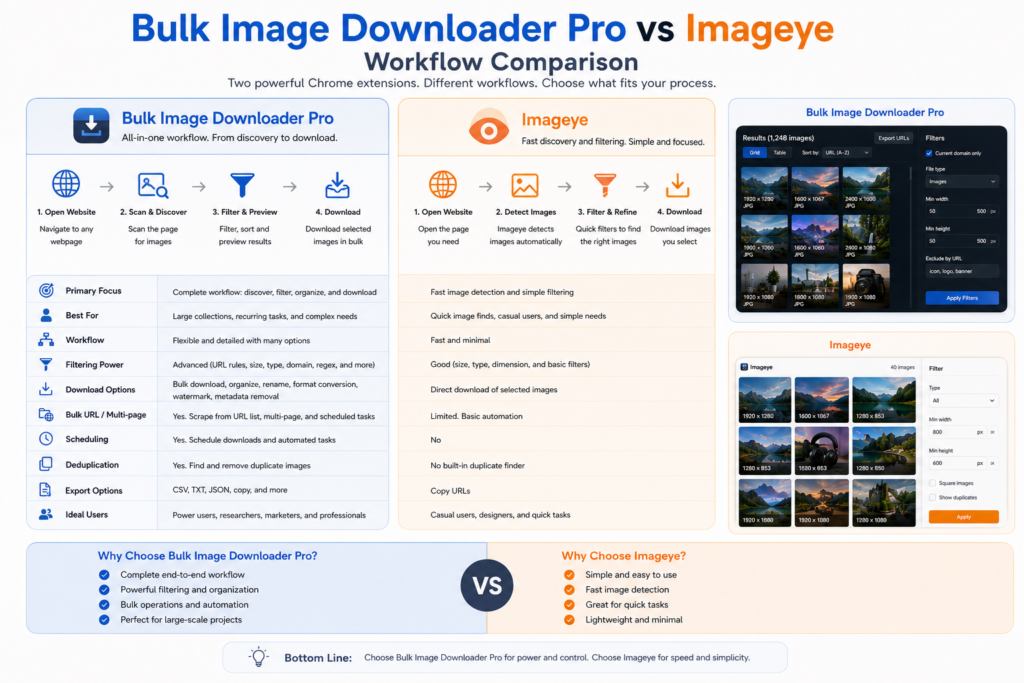
Imageye is a strong current-page image downloader. It finds images on a web page, shows them in a visual interface, supports filtering and bulk selection, offers reverse image search, and includes format conversion features such as WebP conversion. For quick one-page grabs, that simplicity is a real advantage.
Bulk Image Downloader From URL List is aimed at a different workflow: repeated image collection jobs where you need side-panel scanning, URL-list scraping, saved sessions, download tasks, filename construction, folder organization, and optional processing during download.
Where Imageye is the simpler choice
Choose Imageye when you are looking at one page, want to see the images quickly, filter the page result, select what you need, and download with minimal setup. Its reverse image search support is also useful when source-checking or researching where an image appears online. If your job starts and ends on the current page, a focused page grabber can be exactly the right tool. There is no reason to add a larger task workflow when the job is small.Where Bulk Image Downloader From URL List is different
Bulk Image Downloader From URL List is built for jobs that go beyond one current-page pull. The side panel can scan the current page, run Deep Scan for lazy-loaded images, use Area Scan for a selected page region, and scrape a list of page URLs. Results can be filtered, deduplicated, exported, saved as sessions, or sent into download tasks. On the options page, those tasks can use folders, ZIP output, filename construction, Download IF rules, custom filename files, parallel or queued execution, resize, convert, EXIF stripping, watermarking, preview filtering, URL checks, and duplicate review. That is the difference: Imageye is a page grabber; Bulk Image Downloader From URL List is a find-to-folder workflow.Best fit by job type
- One page, quick selection: Imageye is likely faster and simpler.
- Many page URLs: Bulk Image Downloader From URL List fits better because Bulk URL Scraping can collect across a page list.
- Lazy-loaded galleries: Bulk Image Downloader From URL List’s Deep Scan is designed for scroll-and-wait collection.
- Reverse image search: Imageye has the advantage.
- Repeatable naming and folders: Bulk Image Downloader From URL List has the advantage through tasks and filename construction.
- Processing during download: Bulk Image Downloader From URL List supports resize, convert, EXIF stripping, and PNG watermark workflows from the options page.
Repeatability is the deciding factor
The easiest question is: will you repeat this job? If not, Imageye may be the cleaner choice. If you will scrape the same type of page again, manage batches, name files consistently, export task settings, or build an organized folder structure, Bulk Image Downloader From URL List becomes more useful. That is especially true for ecommerce, research, real estate, archive, dataset, and content migration work, where the output needs to be reviewed, named, filtered, and saved predictably.A fair conclusion
This is not a claim that one extension is universally better. Imageye is excellent for fast page-level downloading. Bulk Image Downloader From URL List is better suited to users who need a repeatable workflow around scanning, URL lists, tasks, processing, and organized output. Pick the tool based on the shape of the job: quick page grab or repeatable image workflow.For more options, compare tools in our guide to best bulk image downloader extensions.
Continue reading: Bulk Image Downloader vs Fatkun.