
Image Downloader vs Instaloader
What Instaloader does well
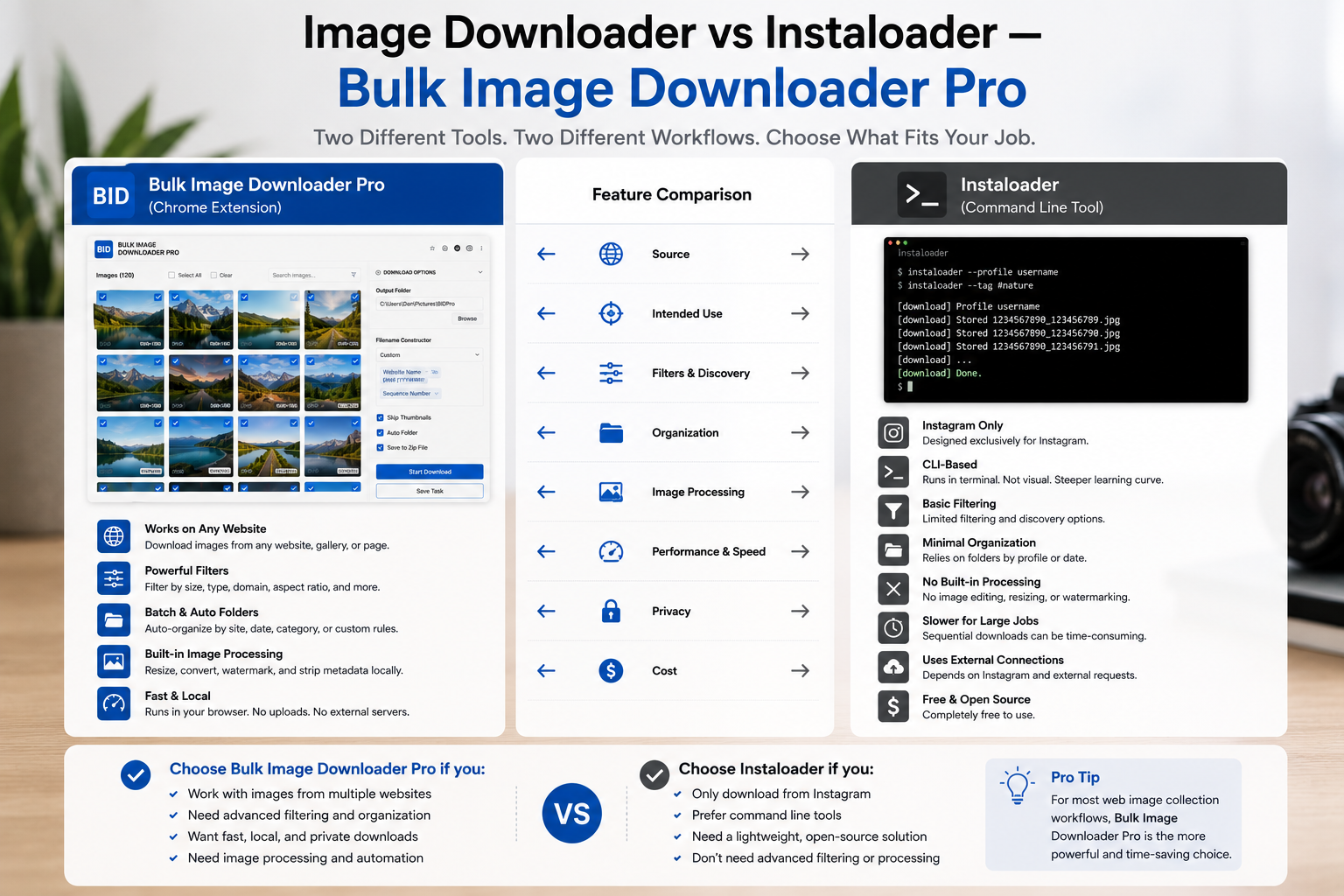
Instaloader is a terminal-native Instagram downloader:- download profiles, posts, tagged media, stories, and highlights with CLI flags
- script repeatable runs for cron jobs or Python pipelines
- store metadata JSON alongside media when configured
- resume interrupted Instagram sessions for long archives
What a browser image extension adds for the open web
- Deep Scan, Area Scan, and Continuous Scanning for lazy-loaded galleries
- side-panel pagination and Bulk URL scrape across many page URLs
- grid and table views with dimension, type, aspect-ratio, and domain filters
- perceptual duplicate finder plus 404 and redirect checkers
- on-download resize or convert (JPEG/WebP/PNG), EXIF strip, PNG watermark (PRO)
- saved tasks, Download If rules, auto folders, and filename constructor tokens
Comparison table
| Need | Instaloader | Browser image extension |
|---|---|---|
| Instagram CLI automation | Yes | No |
| Arbitrary website image capture | No | Yes |
| Visual preview before download | No | Yes |
| On-download resize / convert | No | Yes (PRO) |
| Scripted pipelines / cron | Yes | Limited (saved tasks/CSV) |
| Visual duplicate detection | No | Yes |
Choose by workflow
Pick Instaloader when Instagram is the source and you want terminal automation you can version-control. Pick Bulk Image Downloader From URL List when images live on regular websites, you need to see and filter them first, and you want naming and processing in one browser workflow. Many archivists use both: Instaloader for Instagram accounts, a browser tool for everything else. Install the Chrome extension for visual web image workflows outside Instagram.For more options, compare tools in our guide to best bulk image downloader extensions.
Continue reading: Image Downloader vs JDownloader.Where Instaloader still wins
Instaloader is the better tool when the source is Instagram and the job is scripted. It logs in to an account, walks profiles, hashtags, stories, and highlights, and writes metadata JSON beside the media. It runs headless on a server, which is what you want for cron jobs and repeatable archives. A browser extension should not be your first choice for that.
When to run both
The two fit a common pattern. Use the browser extension to collect and preview images from open pages, catalogues, and editorial layouts where you want to see each image before keeping it. Use Instaloader when the archive lives on Instagram and has to repeat without a person clicking. Neither replaces the other, and there is no reason to pick a side.
What each one is not
Instaloader is not a general-purpose scraper for arbitrary websites, and this extension is not an Instagram archiver. Choosing the wrong one for a job produces work that looks similar at the start and diverges quickly. Matching the tool to the source is more useful than comparing feature counts.